
Issue #11
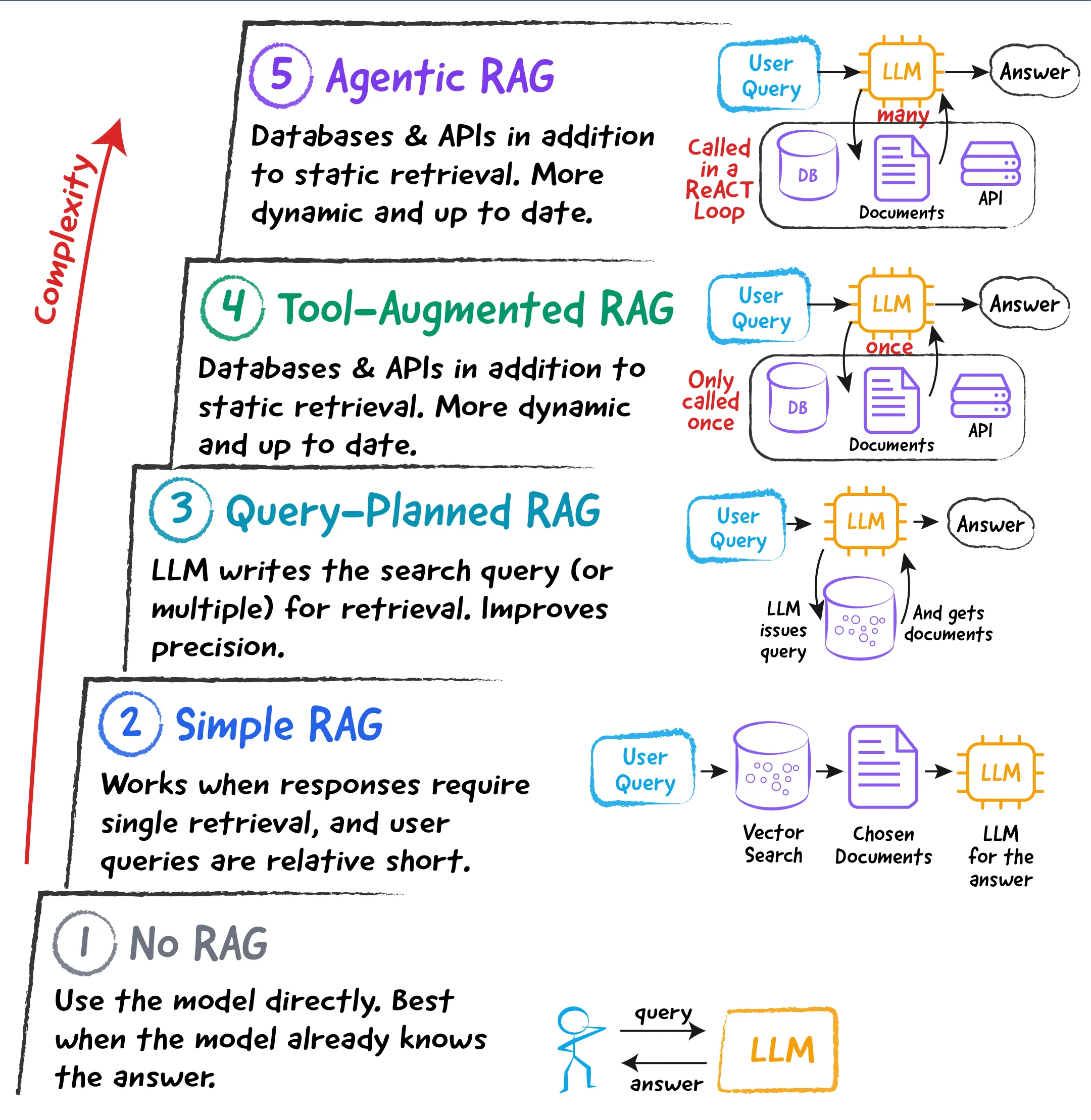
The 5 Levels of RAG
Most people add a vector database over some poorly-written documentation, and supply that as a context to an LLM, and call that a RAG. Instead, the better solution is to find the right trade-off for your specific use case.
 By Raahul 10 min read
 A friend of mine is just entering the world of creating AI agents, moving beyond traditional software engineering. After following a few tutorials, he had created the first RAG application and asked for my help with a critique. Since it would eventually become an internal application deployed to production, it was essential to bridge the gap between the tutorial and real-world demands.
We had a great conversation about the nuances involved in building RAG and how most tutorials skip the essentials. It’s the same as a data science tutorial that focuses too much on which NumPy functions to import and too little on the statistics behind them.
I then decided to codify my points in a way that’s more concise and understandable to everyone, without having to painfully walk through a codebase to do so. I call this the 5 Levels of RAG.
Let’s begin.
Level 1: No RAG
I decided to include this level because it should not be overlooked. If it’s impractical, that’s fine. But do at least consider it.
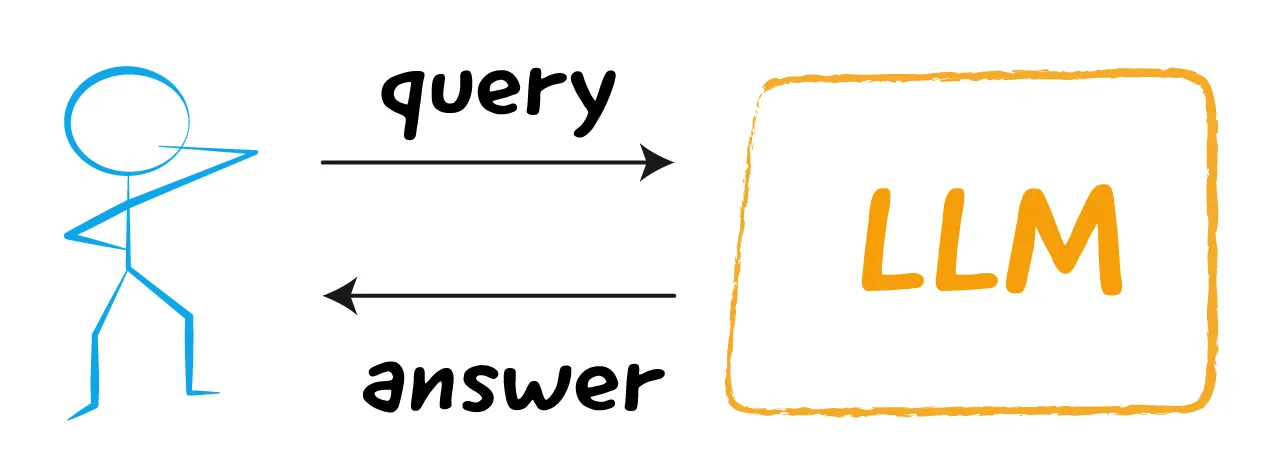
Often, the data you’re working with can comfortably fit within the context without taking up much space. At that point, you have two options:
-
Keep the entire dataset in context.
-
Or, as we’ll see in Level 2, split it and do a traditional RAG.
The advantage of having all the data in the context is that, if that’s possible, you don’t need most of the other levels (as long as you’re not relying on any dynamic data). You don’t have to solve the problem of retrieving the right chunks, support multi-hop retrievals, and handle many other things.
Many novel things can be taught to the LLM in this regard. I’ve taught it internal DSLs, JSON formats, and even complex strategies. You can think of your context as a skill that’s loaded.
Only when your context is too big, such that despite fitting in the context window, the LLM’s accuracy drops significantly, should you start considering other levels.
Level 2: Simple RAG
While the name says “Simple RAG,” there is usually a lot of complexity behind it.
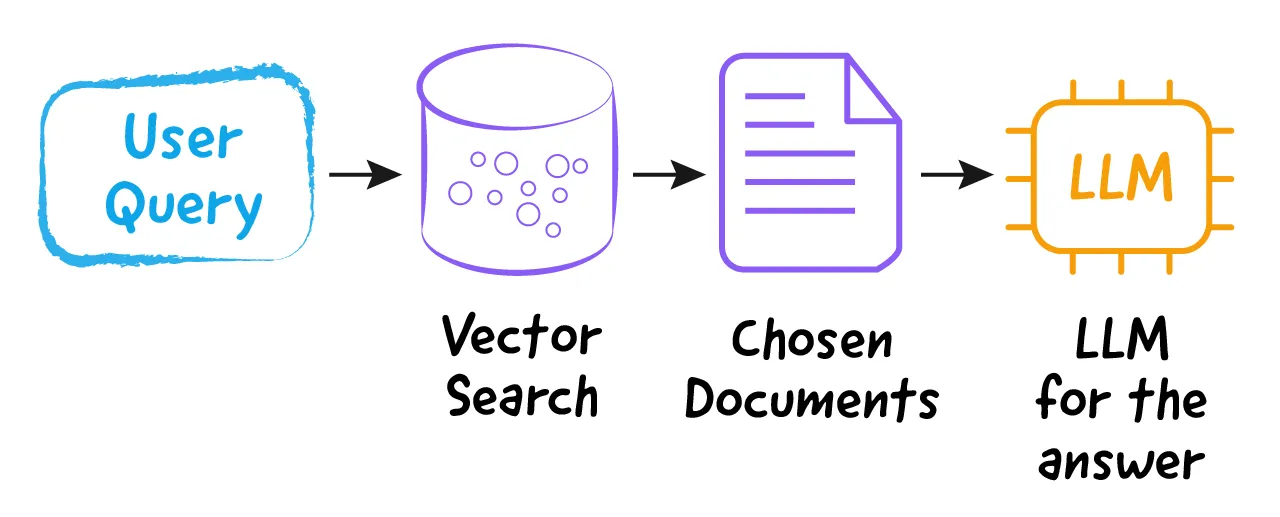
The structure of a simple RAG is very linear:
-
The user enters a query.
-
The vector store looks up information based on the query.
-
The top K chunks retrieved are passed as the relevant context.
-
Then the LLM generates an answer.
Despite having a simple flow, much of the work is hidden in the way you store information in the vector store.
Usual documentation is written for humans. We consume information as semantic chunks, and usually keep a lot of context in our heads. However, giving an LLM partial chunks of information is very dangerous because it often extrapolates in the wrong direction (a phenomenon we call hallucination). You also need to ensure that your chunks are fairly self-contained, which could involve rewriting your documentation in a more LLM-friendly format.
In short, each page of your documentation ceases to be a stepping stone to the next concept and instead reduces to just a more self-contained fact that reads well even when taken out of context. Thus, most of the heavy lifting has to be done in the information architecture rather than the systems design. Most miss this crucial step.
Moreover, another problem with this approach is that your search precision depends heavily on the quality of the user’s query. The primary goal of vector search is to optimize the recall, which a normal keyword search often fails to do.
For example, a vector search can retrieve a document about “money-back guarantee” when searched for “refund policy”, thus improving recall, which a plain keyword search would miss.
However, this assumes that the user query will always be plain and targeted. But just like Google had Google-fu, every kind of search, including the questions you write to LLMs, has its own “-fu”. For example, asking an LLM for epigraphs rather than quotes might yield better results simply because of the context it activates.
Consider that the user types a very conversational query, like “I want to know about the money-back guarantee because I just bought this product yesterday and was looking forward to it, but it’s not the way I thought it was, and certain files were missing, etc.”
Now, this could match a whole lot of things. The query itself is no longer about just one thing. It’s about missing files. It’s about buying the product yesterday. It’s about knowing the money-back guarantee. It’s about a lot. When using that as a vector search query, your precision will tank. The results would surely have things associated with the query (improved recall), but might fail to rank the refund policy at the top (precision tanks).
Thus, while the Simple RAG architecture is straightforward, it might not always perform well. But if you’re building an internal app where you can direct users to submit queries in a specific way, this design might work, though you will still need to invest in your information architecture.
Level 3: Query-Planned RAG
This is an interim architecture that doesn’t introduce novel capabilities; instead, it aims to address the precision problem in Simple RAG.
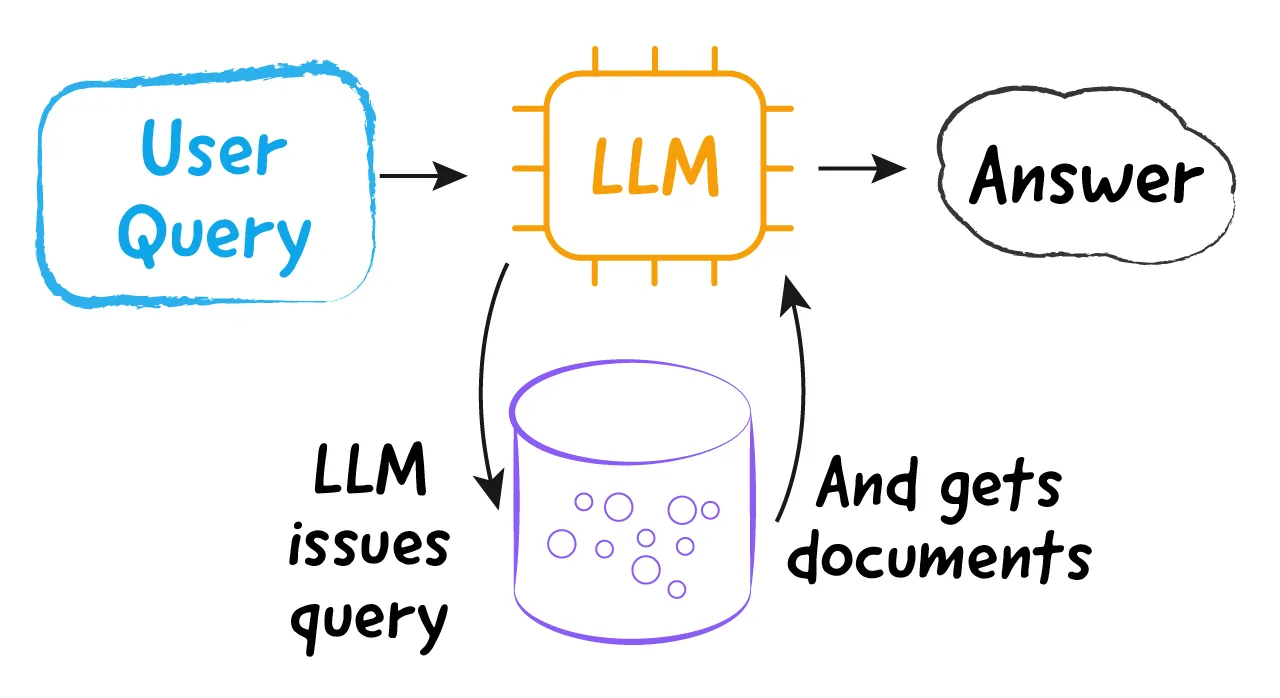
Instead of calling the LLM just once, you call it twice. Here’s the flow:
-
The user enters a query.
-
The query is sent to the LLM, which interprets it and returns a list of search queries to run against the knowledge base. If a user types a very long query, the LLM might return one or more targeted search queries, doing the “query-fu” for us. Note that this can be a simple JSON response from the LLM, rather than a tool call.
-
The system runs those search queries (not the user query) against the vector database, which now yields higher precision while maintaining good recall.
-
The LLM then reads the top K returned documents and generates an answer.
So, you’re calling the LLM twice:
-
First, to decompose the user query into search queries, which would be shorter and more targeted, and hopefully would ignore context that doesn’t matter for the answer.
-
Second, to actually generate an answer.
This is called a workflow because the number of steps is fixed and predefined. The first step always performs query decomposition, and the second step always performs answer generation. This will become relevant when we move to Level 5.
Now we’re in a decent state, provided we already have a good information architecture for our knowledge base. But even with that, this architecture has a major limitation, that it can only fetch static data from some documentation. Often, when building agents that can resolve customer support queries, we also need to look in databases or call APIs for additional context.
That’s where the next level comes in.
Level 4: Tool-Augmented RAG
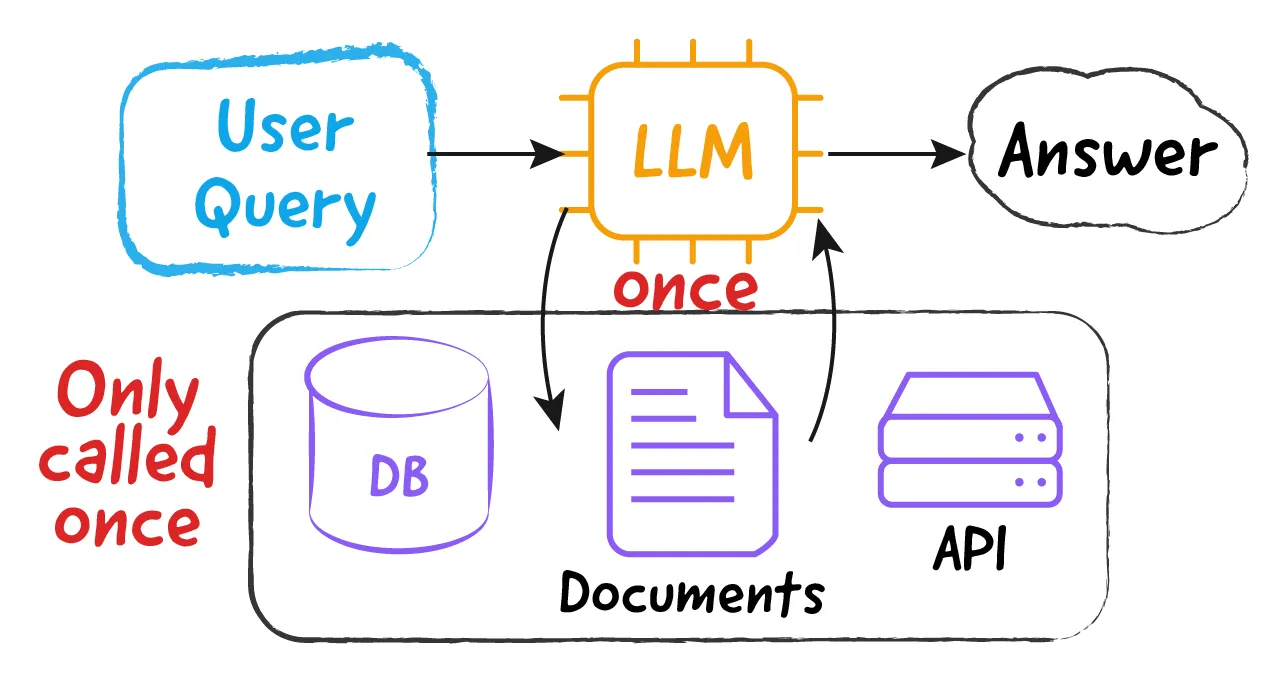
At this level, we equip the LLM with additional access to APIs and databases so it can use dynamic information to answer queries. It remains a two-step workflow.
The First Step
Every LLM API now supports tool calls. Thus, we’ll have the following kinds of tools:
-
A tool for searching the knowledge base (vector search).
-
A set of tools for accessing APIs. There might be one tool per API, or you might even connect to an MCP, which would result in a similar effect.
-
A tool for accessing databases using read queries.
In the first step, the user’s query is passed to the LLM, which returns a set of tool calls to the knowledge base, APIs, or even the database.
Again, this step is deceptively simple. But it’s really not. Your tool descriptions need to be proper. The APIs need to be well-designed in the first place, and there needs to be a discovery mechanism if the number of APIs you have is too large. While we’re not getting into it at this time, I do want to draw your attention to the fact that even the simplest of features requires a lot of complex machinery behind the scenes.
The Second Step
In this step, the context is merely passed to the LLM, which then provides an answer. This step remains the same as Level 3.
Now, we’re at a level where our RAG system can do very interesting things, and that too with high accuracy. However, there’s still one additional enhancement to be made. One that will truly make this RAG system very powerful. However, that power comes with the additional burden of being very precise in your design and thorough in your testing.
Level 5: Agentic RAG
In Agentic RAG, the LLM is continually called in an indefinite loop to keep gathering more context based on any context gathered so far. At some point, the system concludes that it no longer needs additional context and prepares a response.
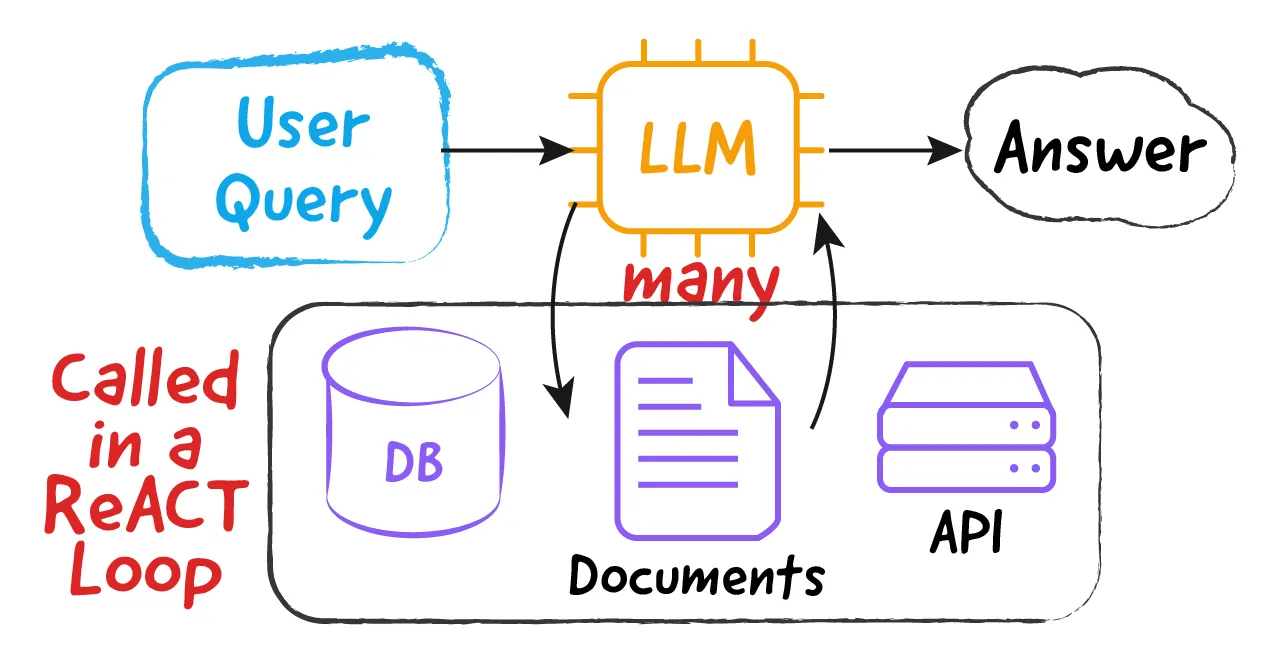
Earlier, we talked about how workflows have a definite sequence of steps, and each step performs the same task every time. When it comes to agents, there are two variances:
-
The number of steps is not known upfront. One question could take just 1 retrieval step to answer. Another question could take 5 sequential retrieval steps to answer.
-
The nature of each step is not fixed. In one case, the 2^nd^ step could be making an API call, but in another, it could be making a database query. Thus, the nature of each step is also not fixed.
Whenever things are not fixed, we call it flexible. And that’s why Agentic RAG is a very simple, yet flexible, architecture. The way it works is simple:
-
User enters a query
-
If the LLM needs context, it issues tool calls for APIs, the database, and the knowledge base.
-
The LLM then reviews the context. If it concludes it needs more context, then it goes back to Step 2. This is the indefinite loop.
-
If the LLM concludes it doesn’t need more context, the LLM simply assembles an answer from the context without issuing any tool calls, and we stop.
This loop is not only more concise to understand, it is also takes fewer lines of code to implement. Yet, it is usually complex to get right, and you end up writing a lot of code as guardrails or for robustness, which makes it bigger than the other variants.
The loop allows for the gathering of information in a linked-list fashion. A document that’s retrieved could point to another document, which the LLM will now ask to retrieve. In the one-shot retrieval case, however, we’re not able to follow those links.
Such agents require very thorough evaluations to ensure they work properly. Because the design is flexible, it can do amazing things that you never programmed it to do, ones that users would love. But it will also go wrong in ways you could never imagine. A slight error in API design or the knowledge base’s information architecture could lead to outrageously wrong outputs.
When testing normal software applications, you probably write one test case for each path of execution. However, in the case of LLMs, which are non-deterministic, you have to test the same thing many times and sum up the results. For example, when testing Google, you cannot search for one keyword and conclude how good the results are. You’d probably search 100 different things and then see the trend. That’s essentially what evals are. And the evals need to be thorough because things can go wrong so subtly.
Having said all of that, building agents this way is one of the most rewarding experiences, because it allows you to solve really great business use cases, as long as you manage the complexity well.
Conclusion
That’s all for this issue! This was a long read because there was so much to look at and understand. I hope you enjoyed it.
See you in Issue 12!
Get the next issue in your inbox
If you want technical depth, applicability, fun, and profit all at once but have never found them together before, The Invariant is the place to be.
Subscribe today if you have not already.
Free. No spam. Unsubscribe anytime.