
Issue #3
Choosing the Right Agentic Architecture
Before you build an agent, pick the architecture that fits the job. Systems design for AI. Not whatever pattern you copied from a blog.
 By Raahul 7 min read
 When we talk about agentic architectures, you hear terms like RAG, ReACT, Workflows, and some such thing. However, talking about these as if they are exclusive architectures is not the right way to design AI systems.
It’s a lot like saying that a certain backend system is a “Kafka Architecture” just because it used Kafka. Well, Kafka’s just one component in the broader systems design.
Let’s look at the core design patterns in AI then.
The Design Pattern Approach
A design pattern is a certain strategy that’s employed to solve a problem. For example, caching is a design pattern that’s often applied to applications and APIs.
Similarly, AI also has different design patterns. Let’s see them in detail.
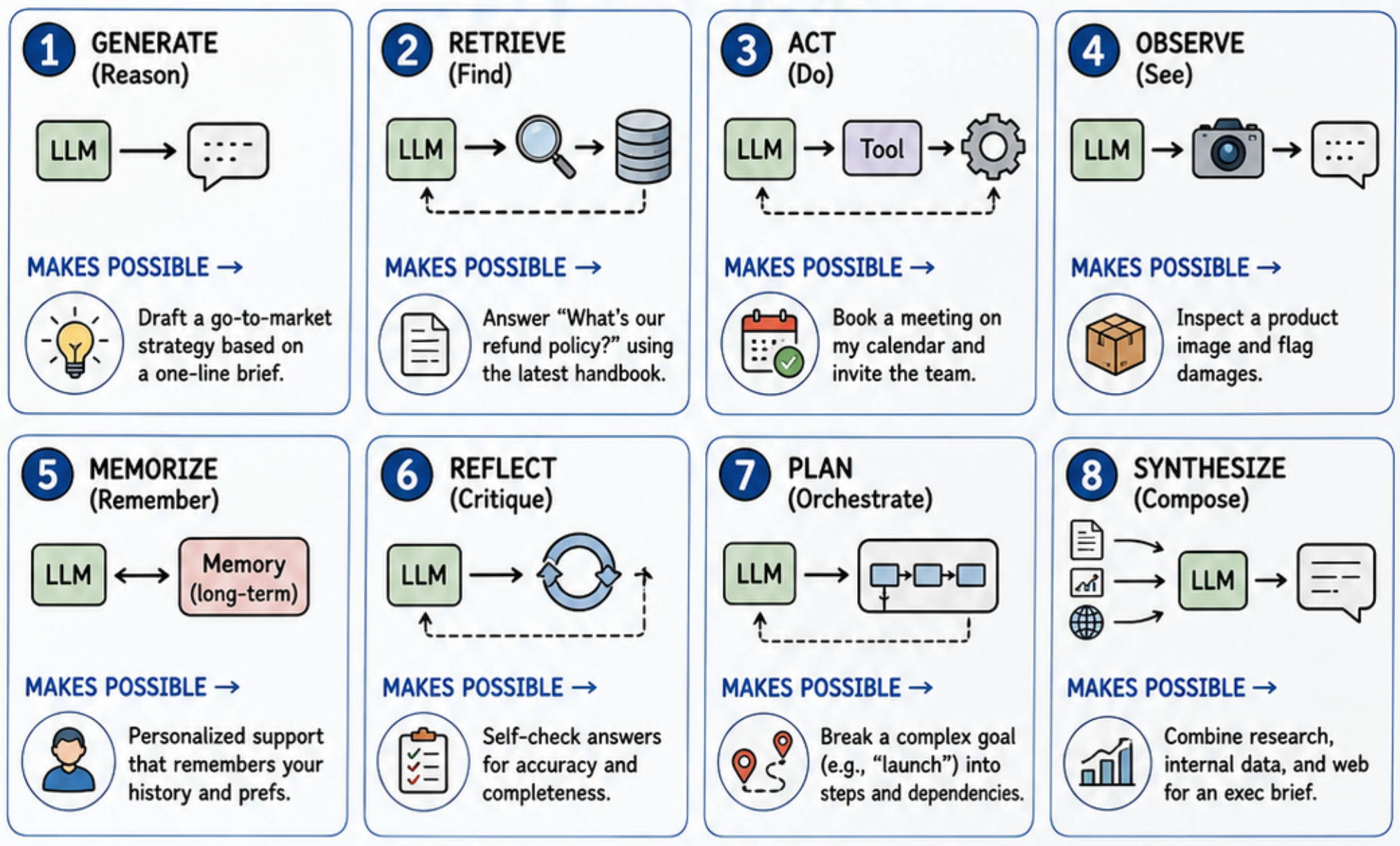
1. Generation
The easiest design pattern is generation. This is where you give a prompt to the LLM, and it gives you an output. The prompt given to the LLM comprises both system and user prompt.
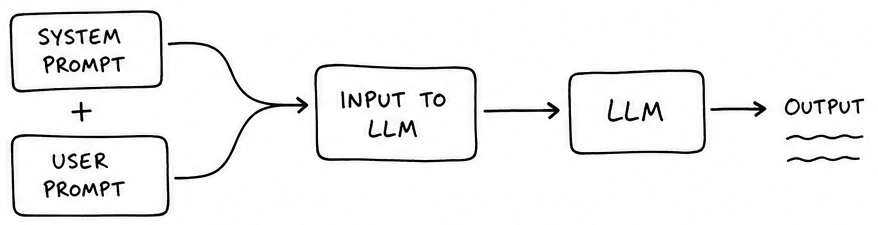
An example would be asking the LLM to generate an email, or a website.
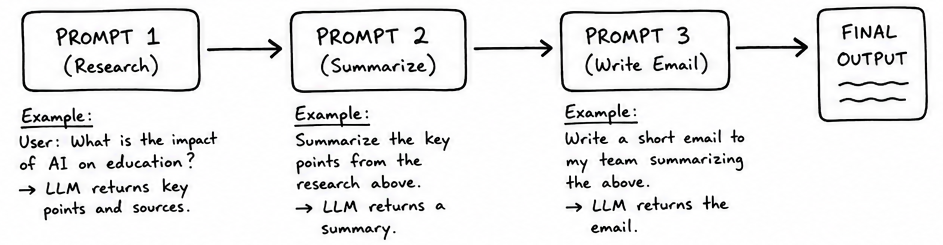
If we take this idea further, you can chain up multiple such prompts, such that the output of one goes as the input of the next, and you have a workflow. The advantage of workflow over just a single prompt is more control over the LLM’s output. The concept of error control is very similar to that of dynamic programming.
2. Retrieval
This pattern, ironically, has nothing to do with LLMs. But we love reinventing old dusty concepts.
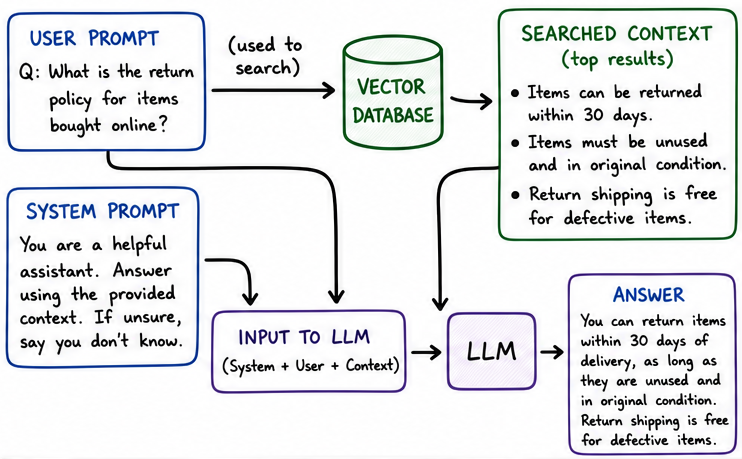
The idea is simple. LLMs sometimes need context in addition to the user’s prompt.
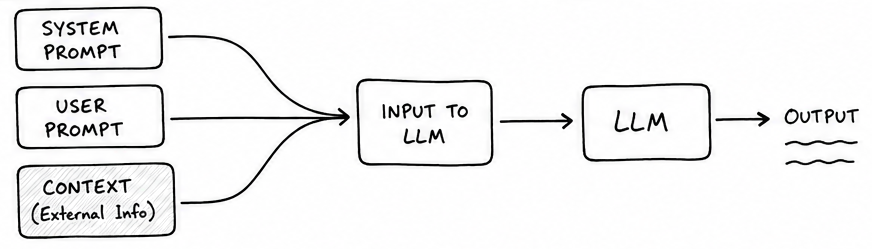
This additional context could be account details, or knowledge-base articles, or some such thing. For example, if you’re building a customer support bot, then you’d want the LLM to have access to your documentation.
But you can’t inject the whole documentation into the LLM, for it’s too big, and most parts are not relevant. Even if you didn’t lose accuracy, you’d still be paying a lot of additional (and unnecessary) cost for it.
That’s why we build a search, which takes the user’s query, and searches the documentation for relevant chunks, so that we only pass that to the LLM. And since the user’s query can be very natural language rather than keyword rich, we end up using vector search. Note that the concept of keyword search, vector search, or even hybrid search are not new at all. Yet, you add it before an LLM, and everyone starts calling it RAG.
3. Action
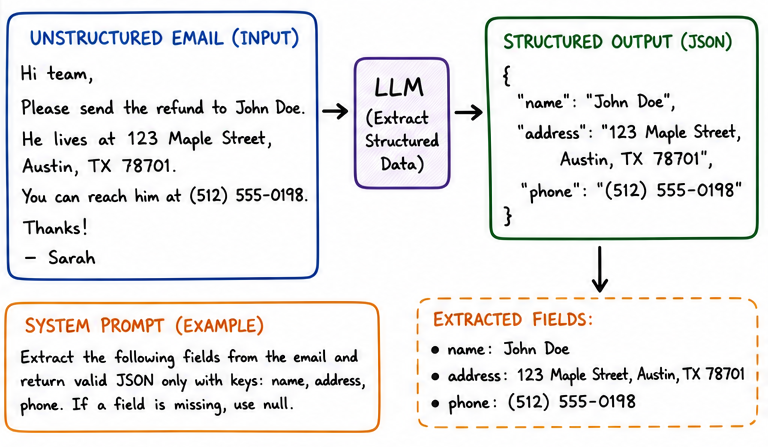
We earlier talked about how LLMs can generate text as outputs. We can also have it generate structured outputs. One example is it extracting names, addresses, phone numbers from emails, as shown below.
But if we put on our LISP hats, and pretend that the JSON being output can be both data and code (isomorphism), then we use the LLM’s JSON output as coding instructions. And that’s exactly what a tool call is.
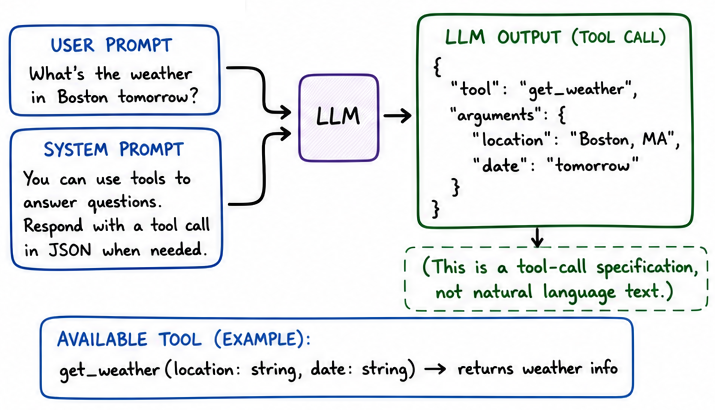
The output is basically a JSON telling us the name of a tool and any arguments to pass to it. What we do is actually invoke the tool on the software side, and feed the results back to the LLM.
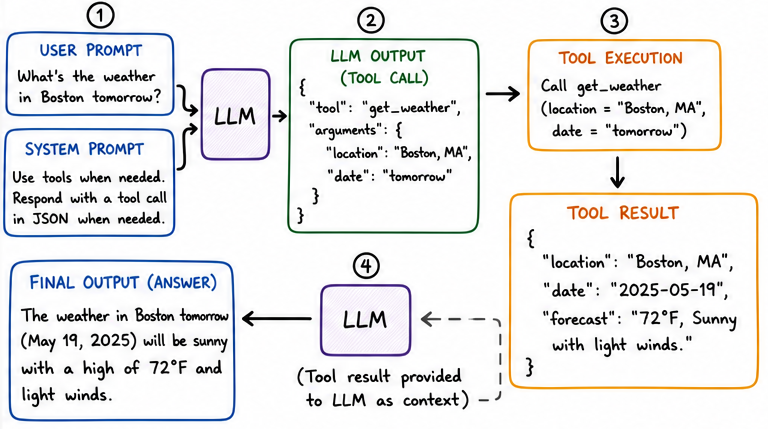
If we do this in a loop, we call that architecture ReACT. But underneath it is this simple design pattern of Actions. When a coding agent makes edits to a file, or reads the source tree to understand it better, it’s using tools for the IO operations.
4. Observation
Observation is very similar to generation, but it’s just the intention that’s different. You give some input to the LLM, and the point is not to create an explanatory output for the user, but to generate observations which can be further used.
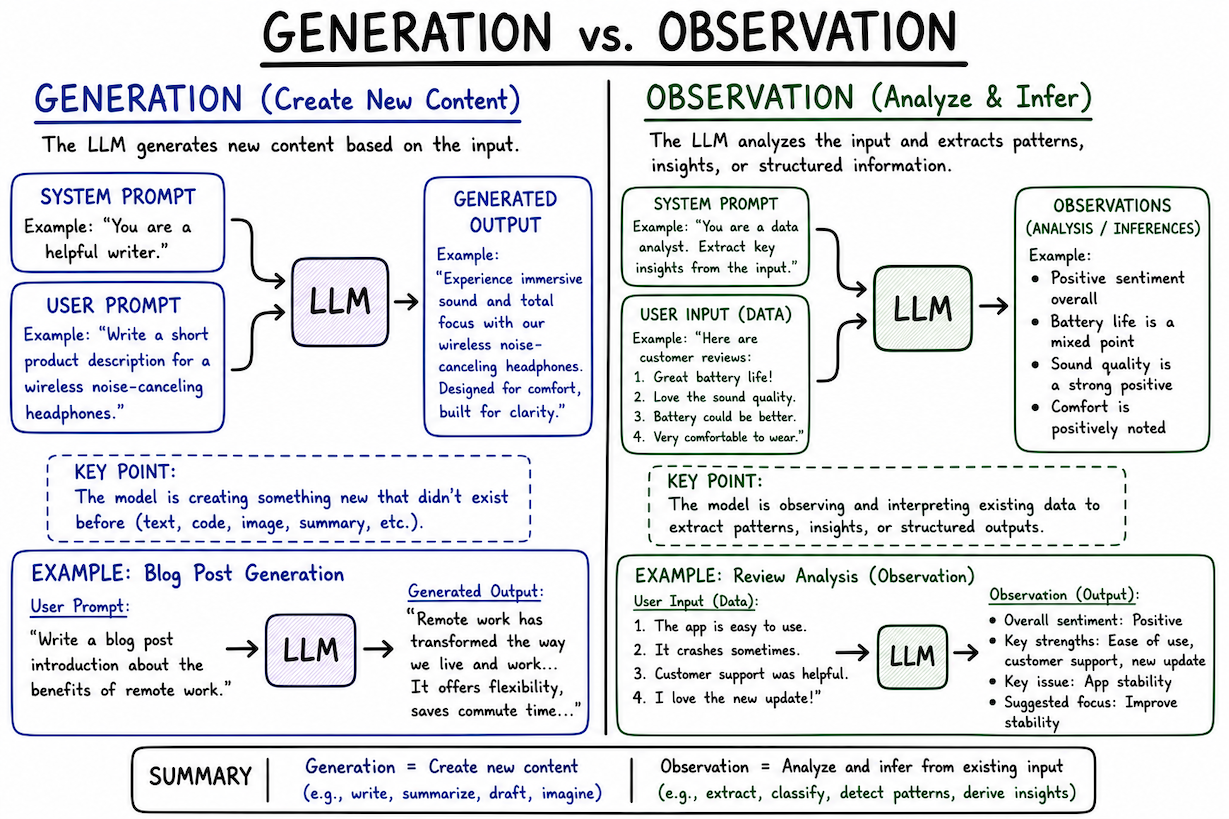
For example, if you’re creating a security audit application using LLMs, you’d want the LLM to write observations in a specific structured format which is not directly consumed by the user. You might further format it, or maybe even validate it if possible. In this case, your focus is on the augmentation of the input itself.
5. Memorize
Memory is a complicated topic inside LLMs. There are several types, but the major ones are below:
- Session Memory: This is the conversation history within a single chat window.
- Preferences: These are the long-term preferences you put in your profile, or the system prompt. It is also a kind of memory.
- Long-term LLM Memory: This is where the LLM itself decides to reference past conversations (like RAG over your chat history) so that it can act more intelligently.
Memory is just additional context. There’s nothing more to it. (except that calling it “memory” sounds very cool)
6. Reflect
We talked about giving the LLM inputs of the user, or outputs of tool calls. But what if we give the LLM its own output and ask it to critique it?
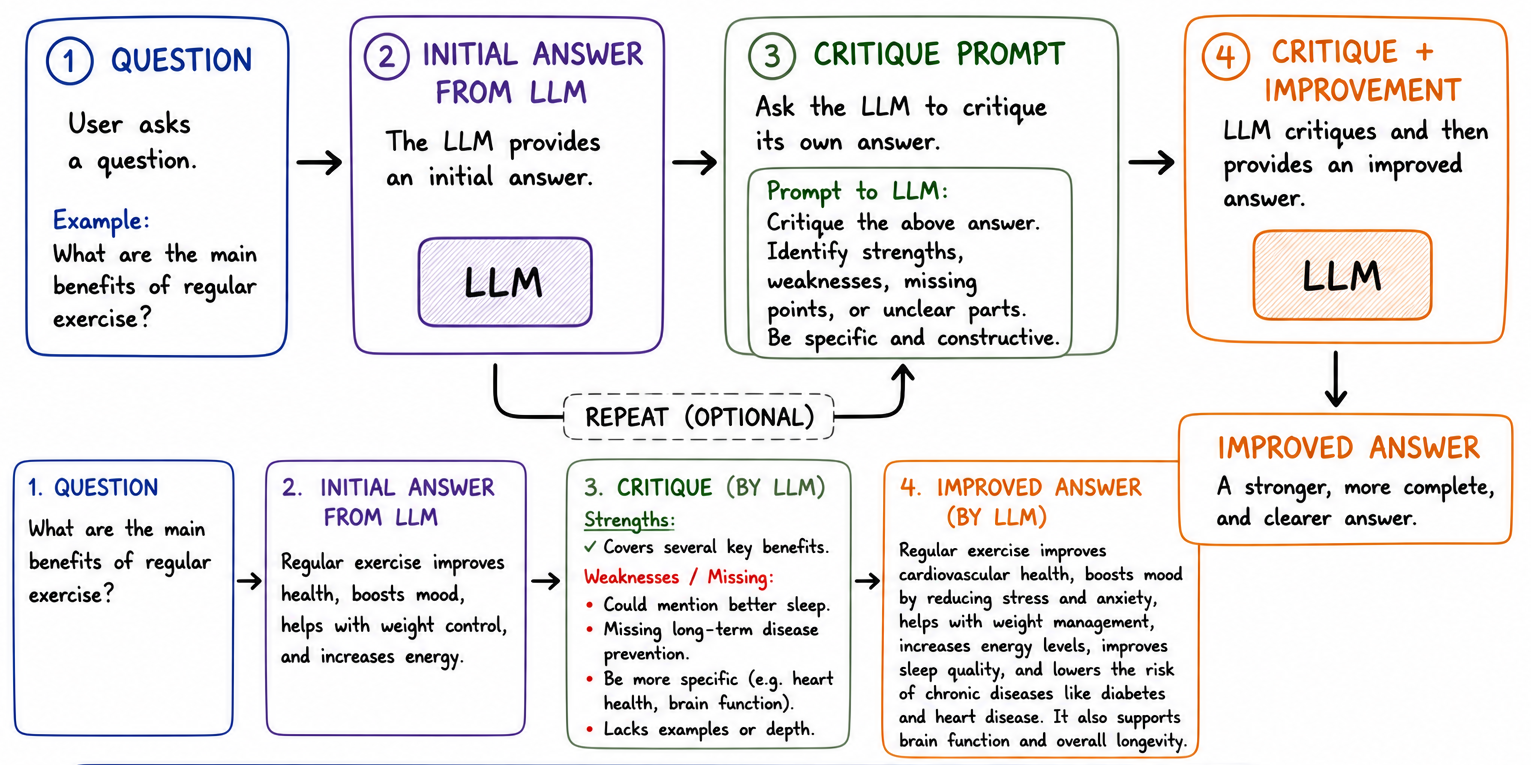
This becomes an additional layer of protection against hallucinations. Many times, the LLM would correct itself and produce a better solution.
7. Plan
One major aspect of any process is that it must be trackable and resumable. Consider building big features. In SaaS startups, bigger features are often broken down into smaller tickets, each with its own dependencies and constraints, and assigned to the right engineers. Not only does this allow for coordination, it also allows us to know the progress, and to know which part of plan is stuck.
We apply a similar concept to LLMs to improve resumability, error correction, and even status tracking.
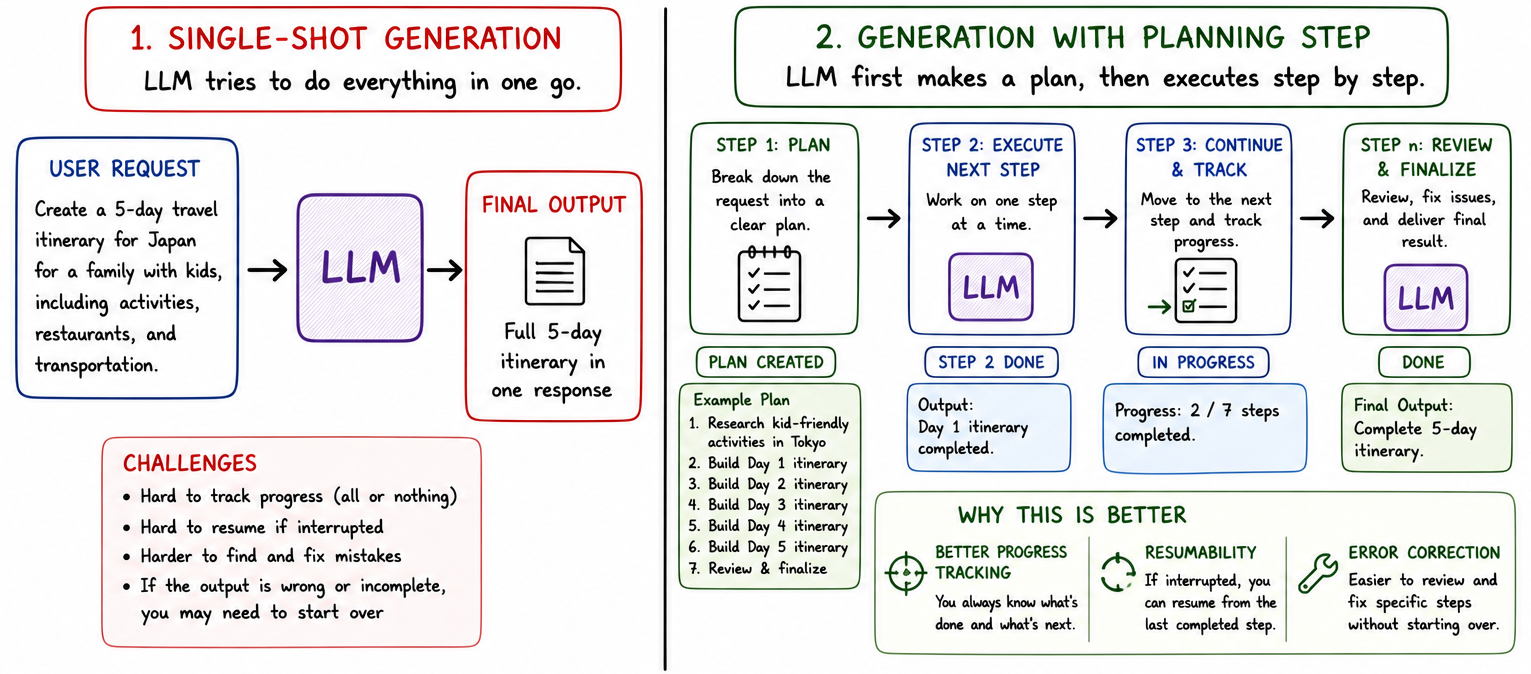
By breaking down things into a plan, the user can first validate the plan and make changes to it. Second, it gives the LLM smaller chunks of work in sequence, thus reducing the chances of hallucinations or drifts. It also allows us to retry specific parts of plan rather than the whole plan. Finally, it allows the user to see progress against a well-defined checklist.
8. Synthesize
When the LLM does a lot of tool calls, or loads different contexts over its run, you’d want it to generate an output that combines them all. That’s synthesis.
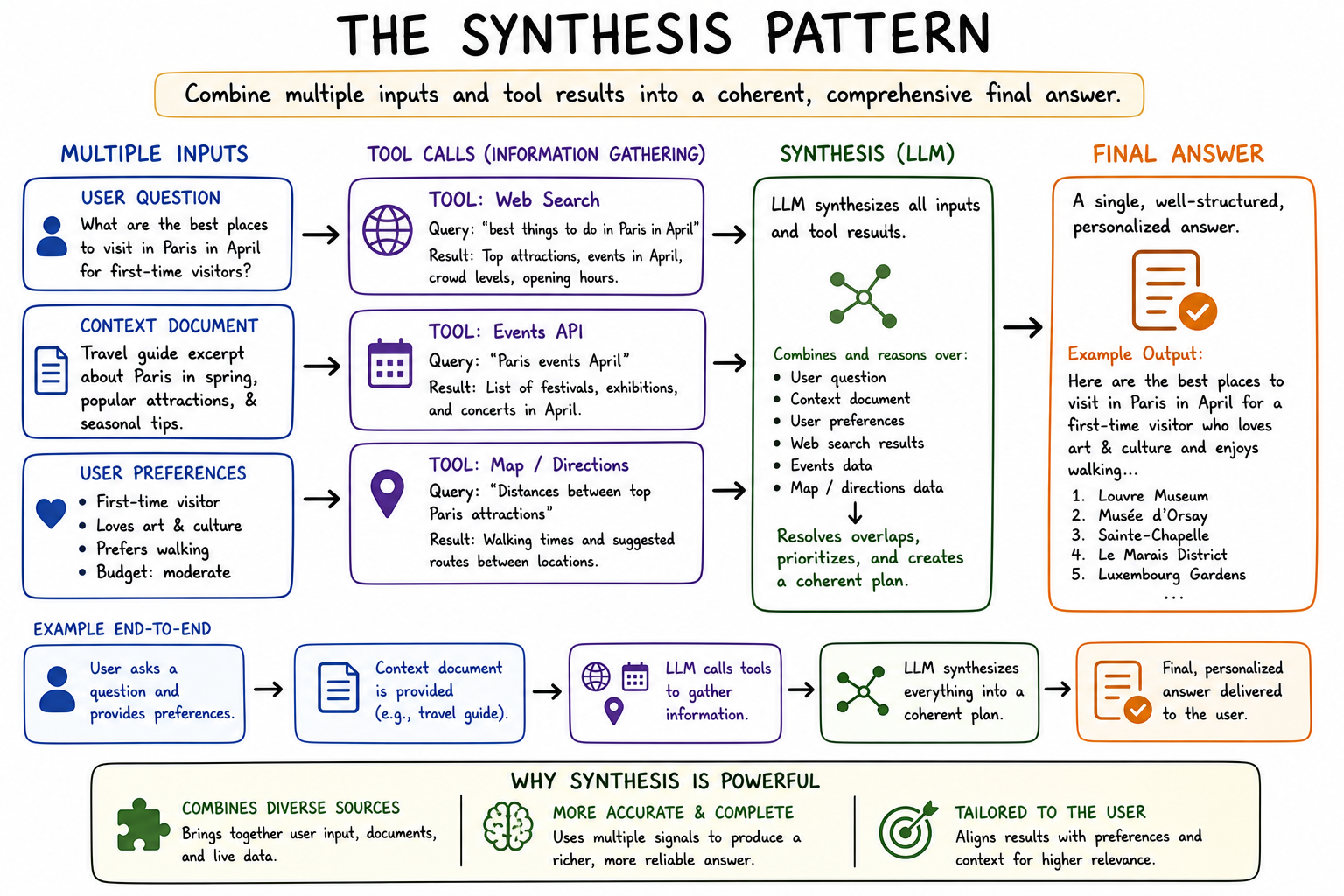
This happens as a last step of RAG or even ReACT. It also happens when you type “summarize my conversation” inside an LLM chat window. Perplexity does this when it shows you the final research report.
With that, we’ve covered most of the major design patterns.
Applying the Design Patterns
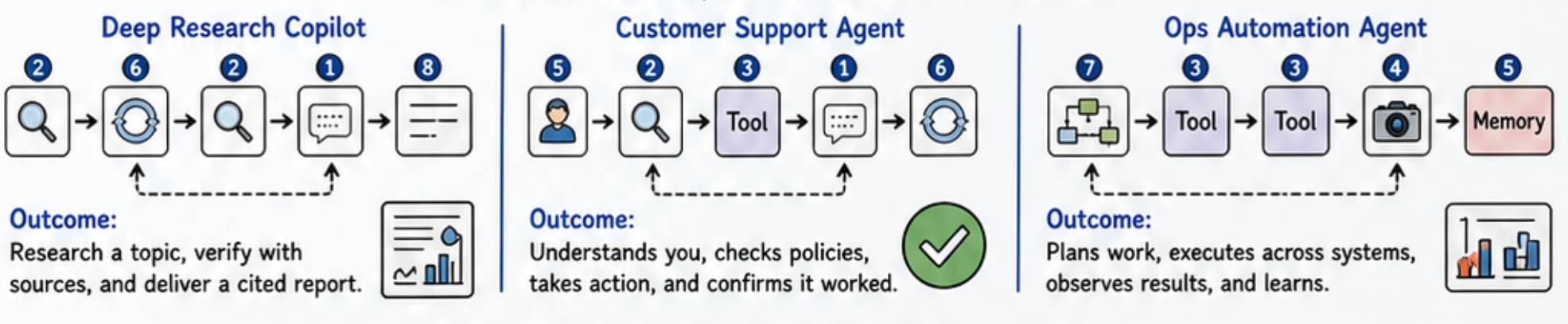
It’s very simple to apply these patterns. Consider a Deep Research agent. You need tools to do searching (Action), and you’d call this in a loop (ReACT pattern). Once you’ve gathered all data, you would summarize the result in a citation-ready document (Synthesize). Those are the basic components of a deep research agent!
In the case of a Customer Support Agent, you’d want to do a RAG on your documentation (Retrieve), call any tools needed for more information (Action), and then summarize a response (Synthesize).
The entire process of building AI agents becomes simplified the moment you break them down into design patterns and learn how to compose them. Try it on one of your own ideas!
Three rabbit holes people seemed to like
A few related ideas on thinking and engineering took off recently:
- Martin Fowler’s Principles Applied to AI-Driven Engineering
- Einstein, Imagination, and AI
- Feynman and the First Principle
Closing Thoughts
That was a lot on designing agentic systems! But it’s all very elementary, especially if you’re already used to designing either frontend or backend systems. The knowledge of systems design is now even more essential, given that even simple LLM-driven use case require at least a few important components.
Try a few of these patterns on your next project. See you in Issue 4!
Get the next issue in your inbox
If you want technical depth, applicability, fun, and profit all at once but have never found them together before, The Invariant is the place to be.
Subscribe today if you have not already.
Free. No spam. Unsubscribe anytime.